


Network and transport layer
Filtering and rate-limit solutions against high-volume attack vectors in the network and transport layers.
- UDP flood
- SYN flood
- DNS amplification
- Fragment flood


TECHNOLOGY AND PLATFORM
Bring detection, filtering and reporting together on one protection platform.
PROCESS
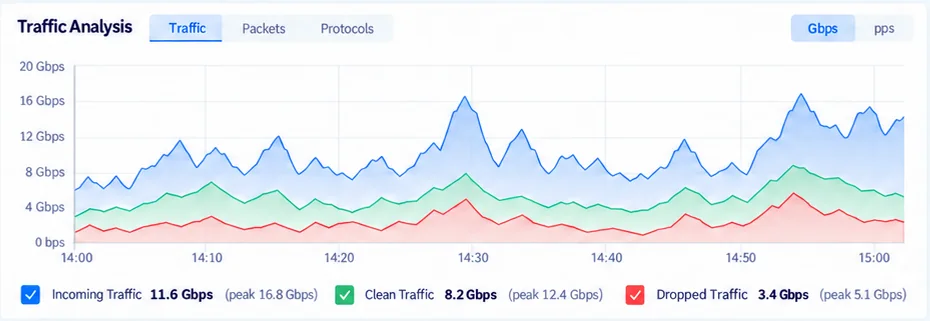
Traffic reaching your network is analyzed continuously, filtered with the policies you define, and the whole process is followed in reports.
Continuous traffic analysis detects abnormal behavior at protocol and vector level.
Stop unwanted traffic with customizable rules, rate limits and filtering policies.
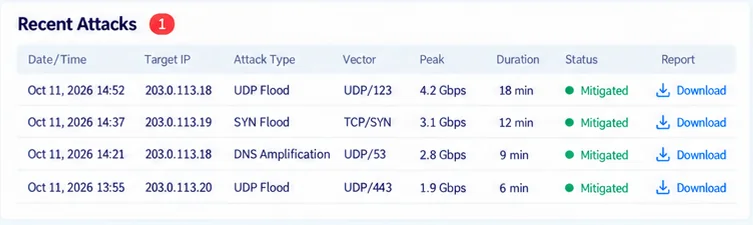
Follow the process with detailed reports covering type, source, impact and time.
DETECTION
Every prefix gets sensible detection out of the box, and you can fine-tune it where needed. Prefix-level checks run every second.
Normal traffic is learned per class (SYN, UDP, amplification, ICMP, fragments and more) and attacks are measured against it.
An attack on a single address is detected even when the prefix total stays low.
Attacks spread over many addresses are caught by the prefix total threshold.
Every attack is classified (UDP flood, SYN flood, amplification, ICMP, fragments, GRE, mixed), with the detection time recorded.
PREFIX MODES
Every protected prefix has its own mode. Start by observing real traffic, then let protection switch on by itself when an attack is detected.
Observes normal traffic, records what the appliance would have done and suggests detection thresholds.
Watches traffic and counts what would be dropped, without dropping anything.
Filters switch on when an attack is detected and off when it ends. The recommended production mode.
Filters are on all the time.
No filtering and no detection. For emergencies only.
Recommended rollout: start with Learning or Monitor, review the “would drop” counters, then move to Automatic. Where permitted, customers can switch between Monitor and Always On themselves.
SCOPE
We define the right filtering and routing model together for different attack types and service needs.
Filtering and rate-limit solutions against high-volume attack vectors in the network and transport layers.
We determine HTTP/L7 and service-specific filtering needs in a technical review.
Scope is evaluated according to the service and connection model.
PLATFORM
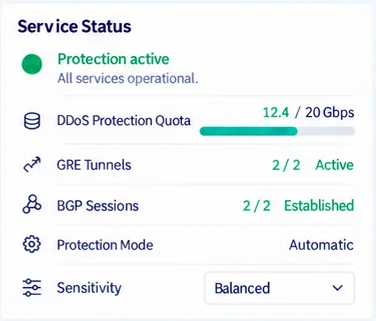
Manage the whole protection process from one central interface, with real-time data and full control.
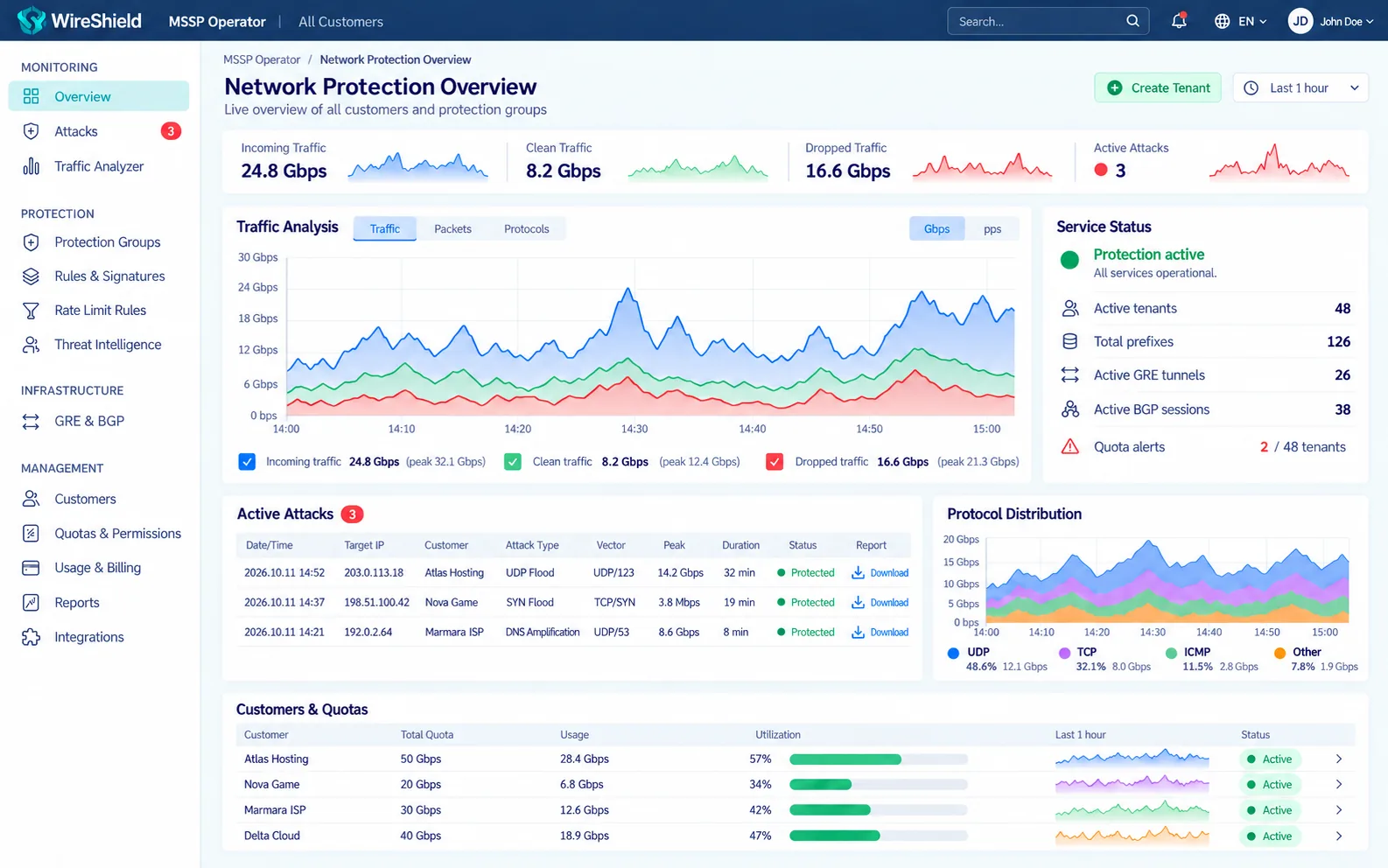
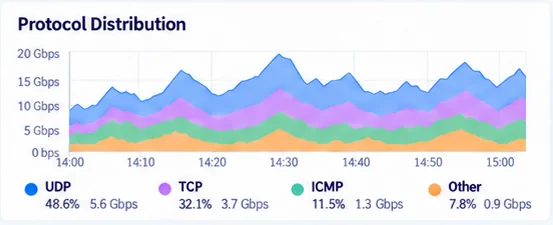
Examine real-time traffic graphs, protocol distribution and attack events on one screen.
Manage your prefixes, define filtering policies and change them instantly.
Review detailed reports with attack type, source ASN, target and time.
TRAFFIC PATH
WireShield can protect inbound traffic only, or follow the whole conversation when your replies also pass through it.
Only inbound traffic passes through WireShield; your replies leave your network directly. The simplest setup, available with Remote protection and with an inline appliance.
When your replies also pass through WireShield, inbound traffic is allowed only if it answers a connection your network started or goes to a service you listed, which stops reflected and spoofed floods that no single packet reveals.
ARCHITECTURE
Integrate with the connection and operating options that fit your network and operating model.
Different connection methods to deliver filtered traffic to your network.
Work with the positioning and routing model that suits your network.
Management and integration options that make daily operations easier.
TECHNICAL RESOURCES
Reach technical documentation for integration, usage and operations.
Step-by-step setup guides for GRE, VXLAN and cross-connect.
OpenProtection status, attacks, rules and reports with sample requests.
OpenPolicy, customers, mitigation, tunnels and integrations for providers.
OpenContact our support team for technical questions.
Open
Our team is by your side for the protection solution that fits your needs.