Technical Guide
How does remote DDoS protection work?
 WireShield Team · 5 min read
Read post


Technical Guide
Inline or Remote? Compare the two DDoS protection models by where traffic is filtered, hardware needs, connection model and operational load, and make the right choice.
WireShield Team
5 min read
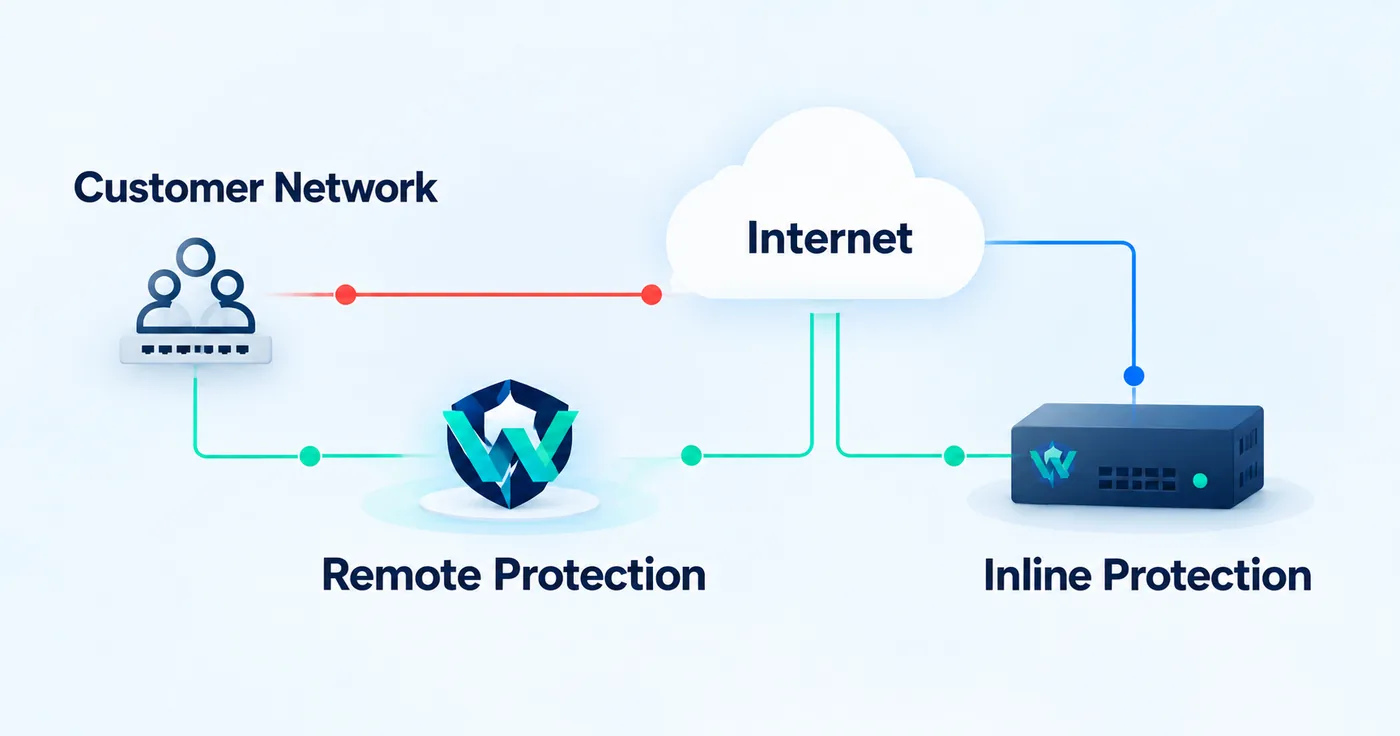
The first decision when choosing DDoS protection is not a technical product, it is a positioning decision: where will traffic be filtered? Outside your network on a remote filtering network (Remote), or inside your network at your own edge (Inline)? Both models use the same protection platform and the same management portals; the difference is the path of the traffic.
With inline protection the device sits in the traffic path, typically between the upstream router and the downstream switch. Traffic is filtered as it passes through; attacks are blocked and clean traffic continues into your network. WireShield's model for this is WireShield Edge: it runs on a ready WS-X appliance or your own compatible server. Traffic does not leave your network.
With remote protection, traffic is routed with BGP to the WireShield filtering network, filtered there, and the clean part returns to you over GRE, VXLAN or cross-connect. No hardware is needed and your servers stay in place. For details see how remote DDoS protection works and the remote protection page.
| Remote protection | WireShield Edge (Inline) | |
|---|---|---|
| Where is traffic filtered? | On the WireShield filtering network | In your own network, inline |
| Hardware needed | None (Router VM if you have no router) | WS-X appliance or compatible server |
| Connection | BGP; delivery over GRE, VXLAN or cross-connect | Inline between upstream and internal network |
| Link capacity | Attack volume is absorbed on the filtering network | Suited to attacks that do not fill your link |
| Best for | Protecting an existing data center and prefixes | Keeping all traffic in your own network |
| Starting point | Your own ASN and prefixes | Hardware and traffic analysis |
One consequence of this comparison matters: inline protection works before your link fills up, but it cannot stop a volumetric attack that exceeds your link capacity before the link. If volumetric risk is high, you need remote protection, where filtering happens in front of the link.
On-site protection and remote protection can be planned together. We decide in the technical discussion which traffic is filtered where. For example, covering volumetric risk with remote protection while solving in-network policy and visibility needs with Edge is a workable design.
Providers protecting many customers manage one or both models from a single MSSP Operator portal, and each customer gets their own Customer Portal. Quotas, permissions, usage and billing are in the same place. Details on the Platform page.
Whichever model you pick, traffic, attack history, rules, rate limits and reports come together in the portal; notifications arrive by e-mail and webhook and the API integrates with your own systems. We explained which data to watch in the UDP flood guide and how to read reports in our attack report post.
It is a difference of positioning, not security level. Inline keeps traffic in your network; remote absorbs volumetric attacks in front of your link. Which fits depends on your link capacity, topology and attack profile.
Remote protection works with your own ASN and prefixes; if you have no ASN, describe your situation to the technical team and we will evaluate the options together. Inline protection does not require an ASN.
Yes, it can be planned. We decide in the technical discussion which traffic is filtered where.
If you are unsure, describe your topology and traffic and we will suggest the model and connection method. The guide to choosing a protection model in the documentation is a starting point; you can also talk to the technical team.
Technical Guide
WireShield Team · 7 min read
Read post
Contact our team to talk through your technical needs.