


SSL/TLS certificates
5.1 About the appliance certificates
- On first boot the appliance generates a self-signed internal certificate. Browsers warn about it.
- You can replace the certificate presented to browsers by the management panel (default 8443) and the appliance's local customer portal: manual upload or Let's Encrypt.
- The internal certificate never changes. The separate portal server (wsportal) connects to the appliance by pinning the internal certificate's fingerprint; changing the panel certificate, or a Let's Encrypt renewal, does not break the portal connection.
- Only
admincan change certificates; every change is written to the audit log.
Settings: Network Settings → Access & TLS → Web certificate (HTTPS).
The card shows the certificate's Names, Issuer, Valid until, type (Let's Encrypt, Uploaded or Internal (self-signed)) and fingerprint.
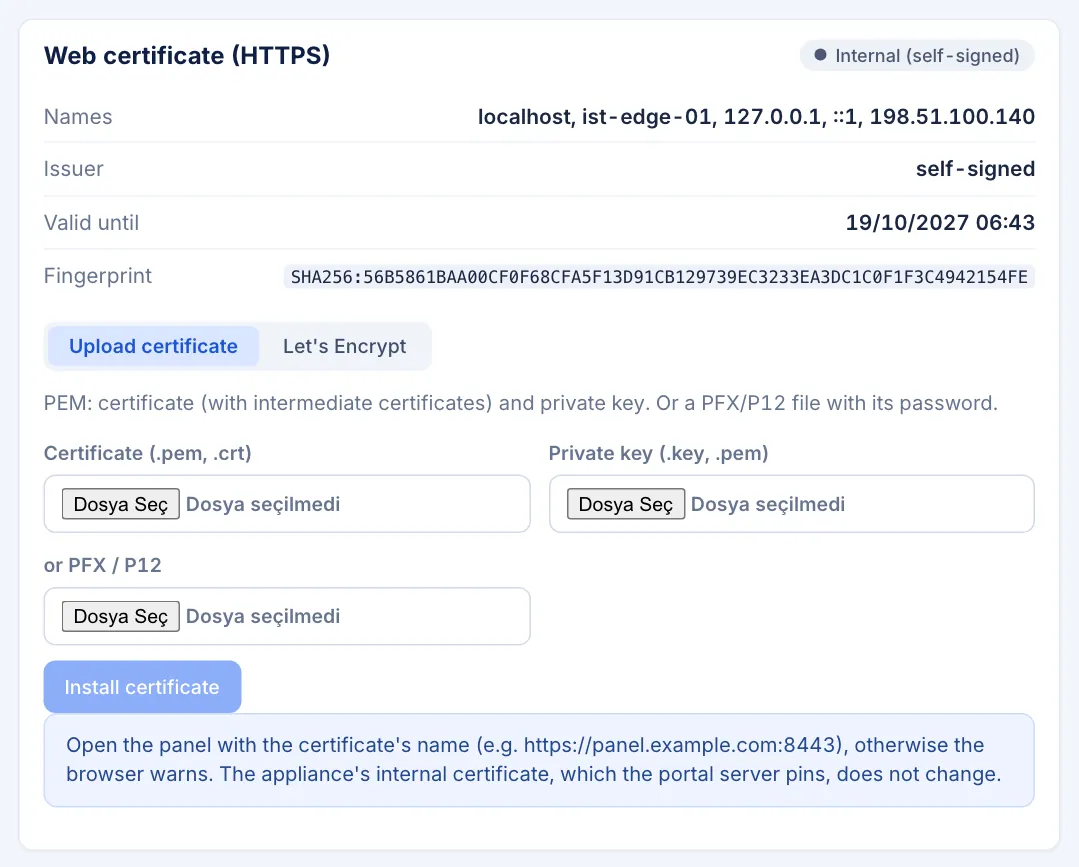
Network Settings → Access & TLS → Web certificate (HTTPS) card — names, issuer, validity, type
5.2 Uploading a certificate
If the panel is reachable only on a local network, or you use your organisation's certificate:
- On the card, select the Upload certificate tab.
- Either choose PEM files:
- Certificate (.pem, .crt): server certificate with intermediate certificates (chain)
- Private key (.key, .pem): unencrypted private key (it may also be inside the certificate file)
- Or choose a file under or PFX / P12 and enter the PFX password.
- Press Install certificate.
Requirements: the key must match a certificate in the chain; the certificate must not be a CA, must be within its validity period and must contain a SAN (domain name or IP); RSA keys must be at least 2048 bits. Encrypted PEM keys are not accepted; use PFX instead.
5.3 Let's Encrypt
- On the card, select the Let's Encrypt tab.
- Domain names: the panel name (e.g.
panel.example.com). Separate several names with commas. - E-mail (expiry notices, optional).
- Validation:
- Cloudflare DNS (recommended): if your domain's DNS is at Cloudflare. Works even when the panel is reachable only on a local network; wildcard names (
*.example.com) are supported. Enter a token with DNS edit permission for the zone in Cloudflare API token (Zone → DNS → Edit). The token is never shown after saving; leave the field empty to keep the stored token. - HTTP (port 80): needs port 80 of the appliance to be reachable from the internet under that name. It is not enabled in the appliance image by default; the option then shows as not enabled on this appliance.
- To try it first, enable Test certificate (Let's Encrypt staging; not trusted by browsers). When it works, disable the option and request again.
- Press Save and request certificate. While the request runs the card shows "requesting certificate…". If it fails, Last Let's Encrypt request failed shows the reason and the current certificate stays in use.
Let's Encrypt certificates are renewed automatically 30 days before they expire. To renew right away, press Renew now.
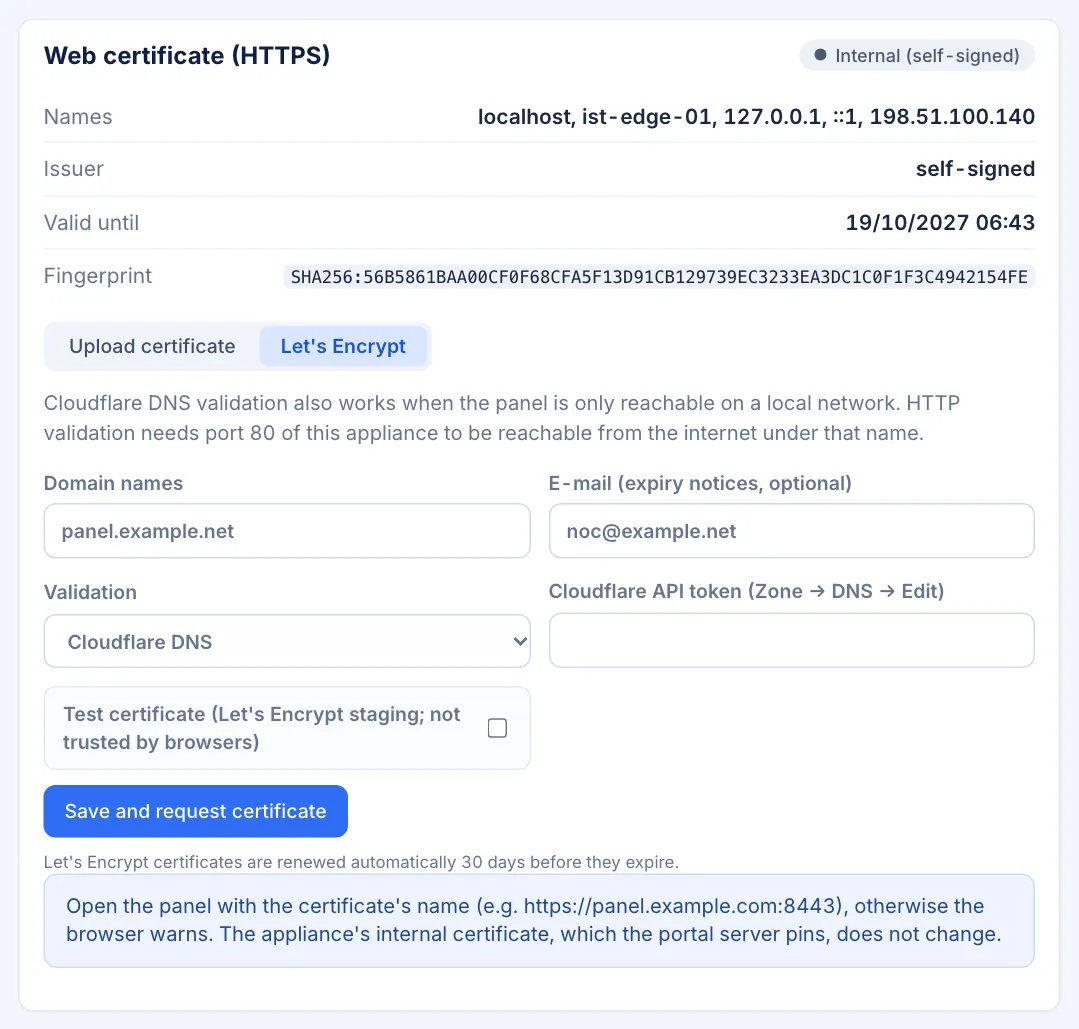
Web certificate (HTTPS) card → Let's Encrypt tab — domain names, e-mail, validation (Cloudflare DNS), token, test certificate
5.4 After installing a certificate
- Open the panel with the certificate's name (e.g.
https://panel.example.com:8443); opening it by IP address still triggers a browser warning. - Make sure the DNS record points to the appliance's management address and the allowed management networks include you.
5.5 Reverting to the internal certificate
Revert to the internal certificate removes the uploaded or Let's Encrypt certificate and its settings. Browsers show a certificate warning again.
5.6 Certificate warnings
The appliance raises a health warning as expiry approaches ("The TLS certificate expires in N days") and shows "The TLS certificate has expired" after expiry. The System page also shows the certificate type, expiry and fingerprint.
5.7 The portal server's certificate
The portal server's public HTTPS certificate is separate from the appliance and is managed with wsportal setup or wsportal cert (Chapter 2.5). On the portal server, Let's Encrypt uses HTTP validation (port 80) and renews 30 days before expiry; behind the Cloudflare proxy, a Cloudflare Origin Certificate is recommended.