


BGP and GRE tunnels
WireShield includes an embedded BGP speaker. The appliance:
- announces protected prefixes to upstream routers or (on a single-port POP) to the ISP, so that traffic for these prefixes comes to the appliance;
- receives prefixes from customers over BGP sessions inside GRE tunnels;
- optionally sends RTBH and FlowSpec requests upstream.
If the appliance only sits inline behind your own router (with static routes), BGP is not needed.
6.1 Enabling appliance BGP
Admin only. Network Settings → Routing & BGP → BGP configuration card.
- Switch on Enable BGP.
- Basic fields:
- Appliance ASN: e.g.
64496 - Router ID: e.g.
192.0.2.10 - Next hop announced to the routers: Next hop (e.g.
192.0.2.10; in routed inline mode, the appliance's upstream address) and IPv6 next hop (optional) (needed to announce IPv6 prefixes, e.g.2001:db8::10) - Under Upstream peers, press Add peer:
- Name (e.g.
edge-router) - Address (e.g.
192.0.2.9) - AS (empty = same AS, iBGP): a different AS makes it eBGP (e.g. the ISP's AS
64511) - TCP-MD5 password: never shown after saving; leaving it empty keeps the current password, remove password deletes it
- GTSM (TTL security) and multihop options (cannot be combined)
- Route announcements & communities: Communities added to announcements (e.g.
64496:100). Ask your upstream which communities it expects. - RTBH, RPKI & IRR:
- RTBH communities (default
65535:666), RTBH next hop and RTBH next hop (IPv6) (used for IPv6 black-hole requests) - RPKI (RTR) servers (e.g.
rtr.example.net:8282) - IRR server (e.g.
whois.radb.net:43) - Customer communities (optional): communities your customers can put on the prefixes they announce over BGP inside their GRE tunnel (6.5).
- Save BGP settings. No restart is needed; when the next hop or communities change, announcements are refreshed without dropping the session.
The card's Example Junos configuration shows an import policy that accepts only your customer ranges carrying the appliance's community. Check the syntax against your Junos version.
If BGP settings were previously defined in the configuration file, the card says so; saving from the panel takes over. Use the configuration file removes the BGP settings saved in the panel.
The firewall accepts TCP 179 only from configured routers and from customer neighbours inside tunnels; with BGP off, 179 is closed completely. Neighbours are IPv4 only.
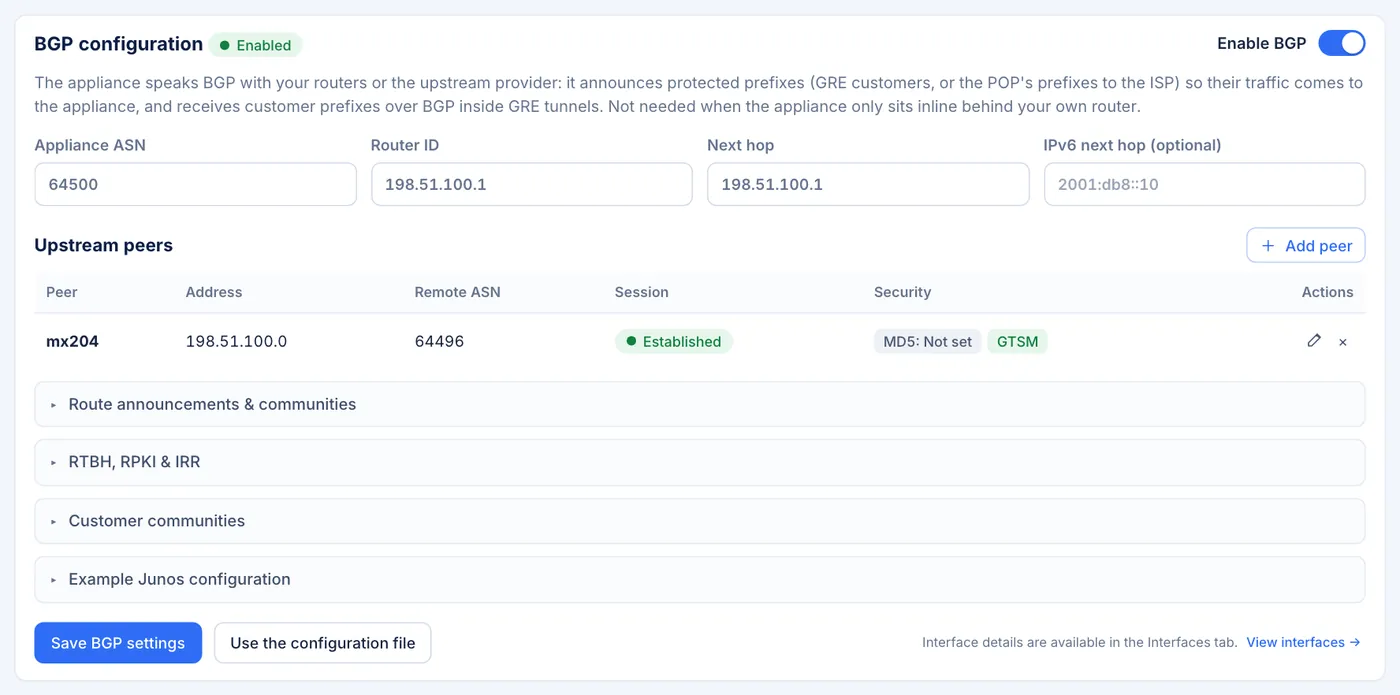
Network Settings → Routing & BGP → BGP configuration card — ASN, Router ID, next hop, upstream peers table (MD5/GTSM tags) 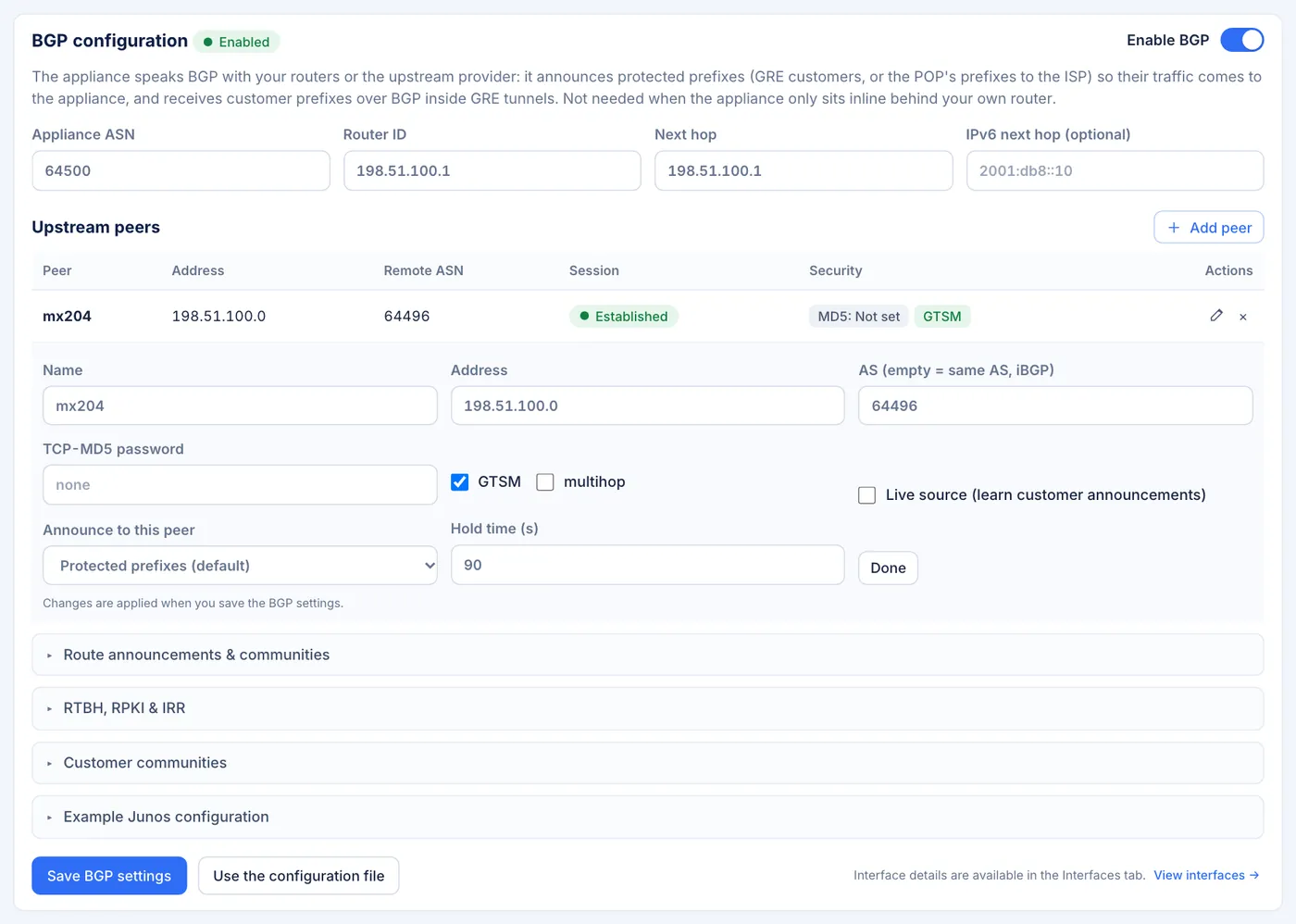
Upstream peer edit row — Name, Address, AS, TCP-MD5 password, GTSM, multihop
6.2 Monitoring sessions
The MSSP → Infrastructure → GRE & BGP page:
- BGP summary: state (Running / Starting / Off), established sessions, received prefixes, announced to router.
- BGP sessions table: Type (upstream router or customer), Peer, State, Uptime, Accepted / received, Security (MD5 · GTSM).
- Announced and received prefixes table: Prefix, Source (POP link, Static (tunnel), BGP from customer), Origin AS, Status (Active, Pending, Rejected). Rejected prefixes show the reason (e.g.
not-authorized,rpki-invalid,irr-no-route,too-long,tenant-quota,recursive).
The BGP session summary also appears in the Network Settings status strip. In the console shell: bgp status, bgp sessions, bgp prefixes.
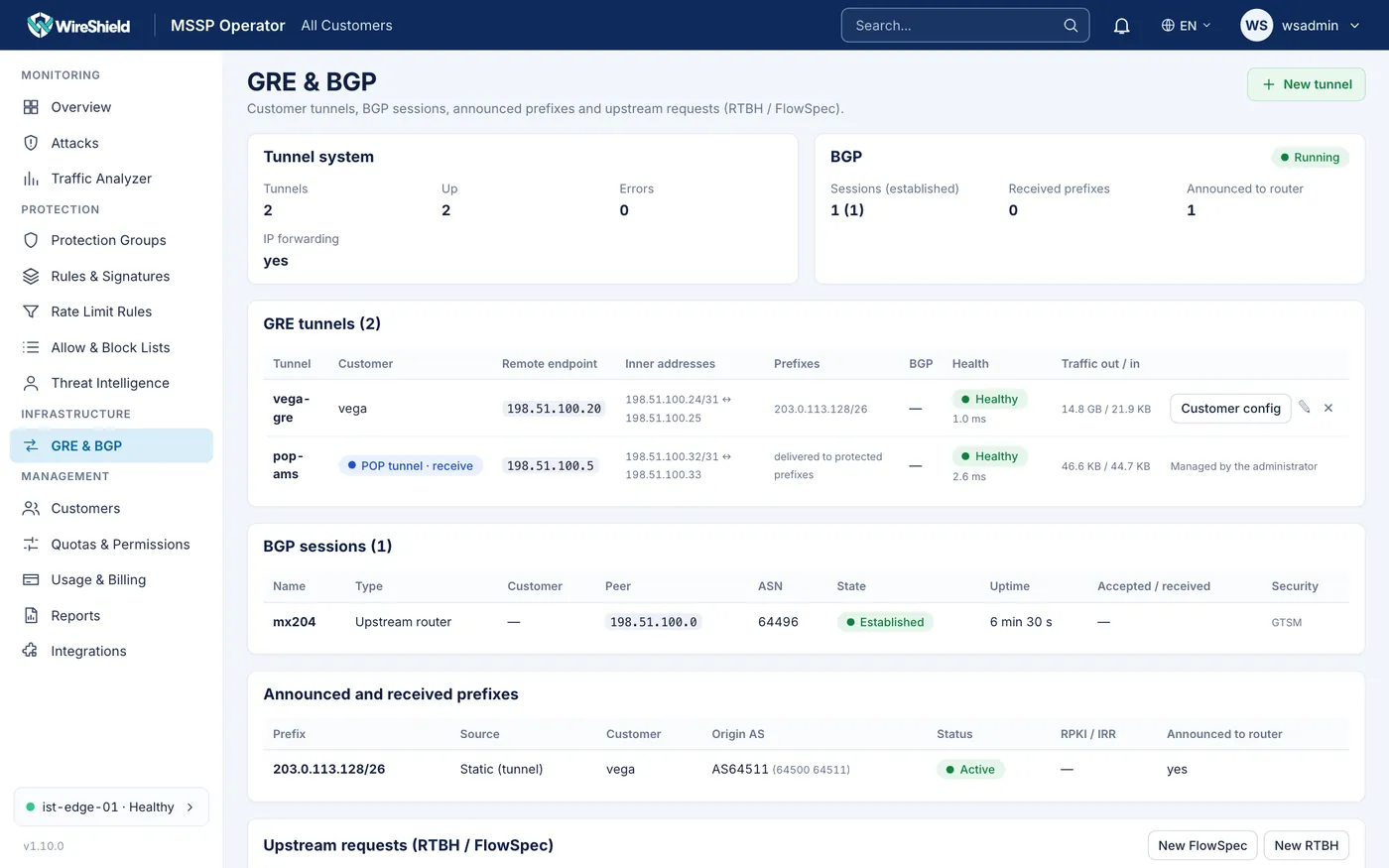
MSSP → GRE & BGP — BGP summary, BGP sessions table, announced and received prefixes
6.3 Announcement AS path
When a POP announces a prefix, the AS path is by default only our AS (we originate it). If the customer's own AS or downstream ASes must be visible:
- Customer default: on Customers → <customer> → Announcement AS path (default), enter AS numbers separated by spaces (e.g.
64500, or64500 64501for a customer's downstream; the last AS is the origin). - Per prefix: the Announcement AS path card on the prefix detail page. If empty, the customer default applies (the card shows it).
Rules: at most 8 ASes; 0, 23456, 65535 and 4294967295 are refused. Only staff (admin/operator) can set it; the customer portal does not show it. When the path changes, the route is withdrawn and announced again with the new path. On the ISP the path looks like <ISP AS> <our AS> <customer ASes…>.
Prerequisite: your ISP's import filter must accept the customer's AS through your AS-SET (IRR records and ROAs); otherwise the announcement is rejected.

Prefix detail → Announcement AS path card; Customer detail → Announcement AS path (default)
6.4 Customer GRE tunnels
A GRE tunnel carries cleaned traffic to the customer's router. The customer's return traffic does not come back through the tunnel (asymmetric).
- On MSSP → GRE & BGP, press New tunnel.
- Fields:
- Name, Customer
- Appliance address (tunnel source): an IPv4 address of this appliance
- Customer router address (tunnel destination): the customer router's public IPv4 address (cannot be inside a protected prefix)
- Tunnel inner address (appliance) and Tunnel inner address (customer): e.g.
169.254.1.1/30and169.254.1.2 - GRE key (optional), MTU (empty = automatic) (1476 without a key, 1472 with a key)
- Prefixes routed into the tunnel (one per line): each must be inside one of the customer's protected prefixes. With BGP on, they are announced to the upstream routers.
- Clamp TCP MSS (recommended)
- No health probe (customer blocks ICMP): if the customer blocks ping to the inner address
- Comment
- Create.
- The Customer config button in the table shows ready Linux and Junos examples for the customer router, for example:
ip tunnel add ws0 mode gre local 203.0.113.50 remote 192.0.2.10 ttl 64
ip link set ws0 mtu 1476 up
ip addr add 169.254.1.2/30 dev ws0
The tunnel table shows the remote endpoint, inner addresses, prefixes, Health (Healthy, Degraded, Down, Unknown), loss/latency and traffic out/in. Health is monitored with ICMP probes (5 s interval; Down after 3 losses); a system alert is sent when a tunnel goes down. Probing never shuts a tunnel down by itself.
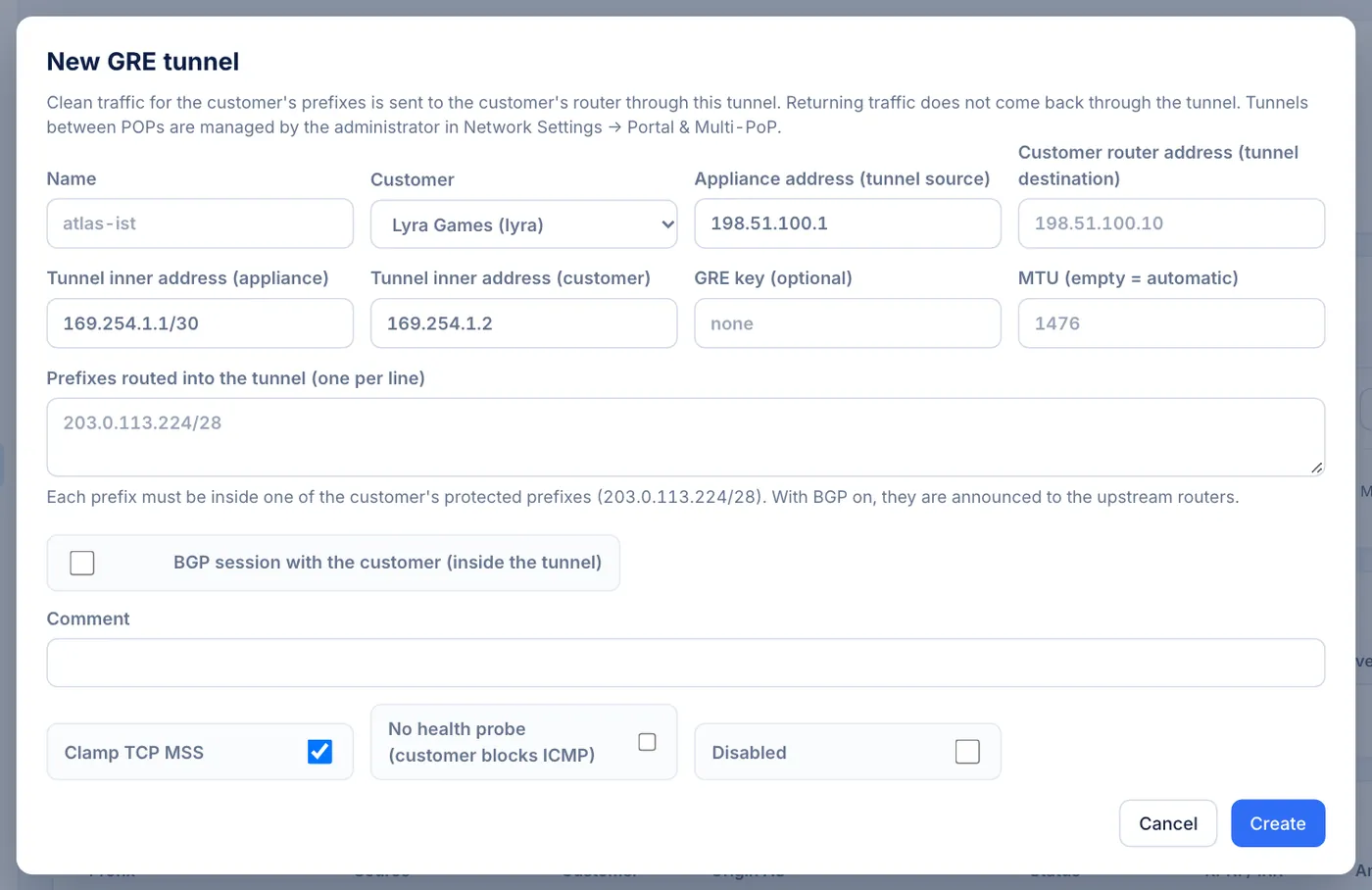
MSSP → GRE & BGP → New GRE tunnel form 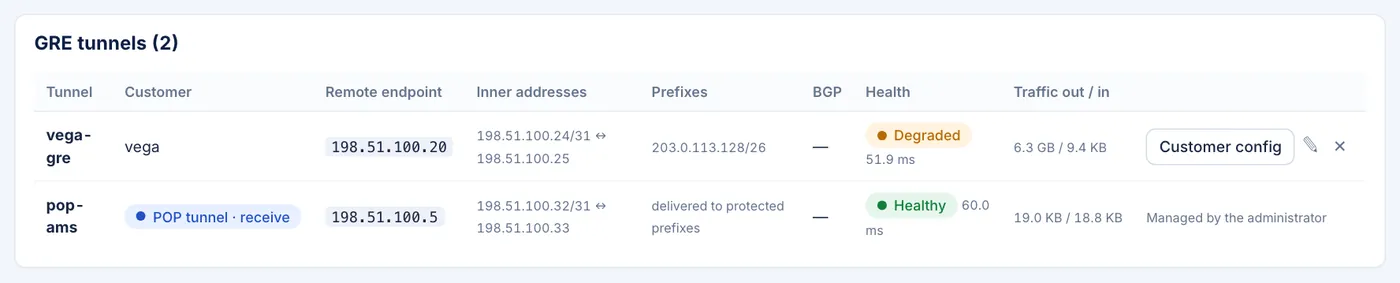
GRE tunnels table — health, traffic, Customer config example
6.5 Customer BGP inside the tunnel
The customer can announce its prefixes over a BGP session inside the tunnel. Appliance BGP must be on first (6.1).
- On Customers → <customer> → Authorized BGP prefixes, enter the ranges the customer may announce over BGP. More specifics are accepted up to /24; announcements outside these ranges are rejected.
- In the tunnel form, enable BGP session with the customer (inside the tunnel):
- Customer AS number (e.g.
64510) - AS-SET (optional) (for the IRR check)
- Max prefixes: the session is closed if exceeded
- Mode for learned prefixes and Protection profile: accepted prefixes are protected with this mode and profile
- RPKI: reject invalid (default), require valid, off
- IRR: warn (default), require, off
- Session disabled: to turn the session off temporarily
- Save.
An accepted prefix is routed into the tunnel and announced upstream only after the data plane protects it. If the RTR/IRR servers cannot be reached, the check passes with a warning.
Customer communities
On Network Settings → Routing & BGP → BGP configuration → Customer communities (admin), you define communities that customers with a BGP session over their GRE tunnel can put on the prefixes they announce:
- RTBH request community (e.g.
64496:666): an announcement carrying this community is a black-hole request. After the usual checks (the address must belong to the customer; the appliance's own infrastructure addresses are never blackholed) it is sent upstream as RTBH (6.6). It appears in the Upstream requests table with source customer and is withdrawn when the customer withdraws the announcement. - Community → Protection profile table: type a community in
ASN:valueform (e.g.64496:101), press Add, then choose the profile in the row. A prefix announced with that community is switched to that profile; Remove deletes the mapping.
Changes are applied when you save the BGP settings. Tell your customers which communities you support.
6.6 RTBH and FlowSpec (upstream requests)
When an attack exceeds the link capacity, you can ask the upstream routers for help. Requests are sent to routers only.
RTBH (remotely triggered black hole):
- On MSSP → GRE & BGP → Upstream requests (RTBH / FlowSpec), press New RTBH.
- Target address (a single IP; the customer is found from the address), Duration (hours, at most 24), Reason.
- Send RTBH.
Caution: RTBH makes the upstream routers drop all traffic to that address, including legitimate traffic. Use it only when the attack exceeds the link capacity.
- Pending requests (for example policy suggestions) show as Waiting for approval; press Approve or Deny. An active request shows as Active at upstream and is removed with Withdraw. Expired requests are withdrawn automatically.
- The appliance's own infrastructure addresses can never be blackholed. Limits: 50 active requests per customer, 500 in total.
FlowSpec: the upstream routers drop or rate-limit only the matching traffic before it reaches your link. The upstream must accept FlowSpec on the BGP session.
- On the Upstream requests (RTBH / FlowSpec) card, press New FlowSpec.
- Fields:
- Target (address or prefix): a single address or a prefix of /24 or longer (IPv6 /48 or longer), e.g.
203.0.113.10/32 - Customer: found from the address (default) or a chosen customer
- Protocol: any, UDP, TCP, ICMP or GRE
- Source prefix (optional): e.g.
198.51.100.0/24 - Source ports (e.g.
123, 1900, 11211) and Destination ports (e.g.80-443) - Packet length: e.g.
400-1500 - Action: Discard, or Rate limit with Rate (Mbit/s)
- Duration (hours, at most 24): default 1
- Reason
- Send FlowSpec.
A rule for a whole prefix (not a single address) needs at least one more match (protocol, ports, source or length), so that not all traffic is dropped. Sending the same rule again renews its duration. In the requests table, the Target column shows the full match, for example 203.0.113.10/32 udp sport 123 dport 80-443 len 400-1500 → discard; Withdraw removes the rule. In the console shell, escalation list lists the requests.
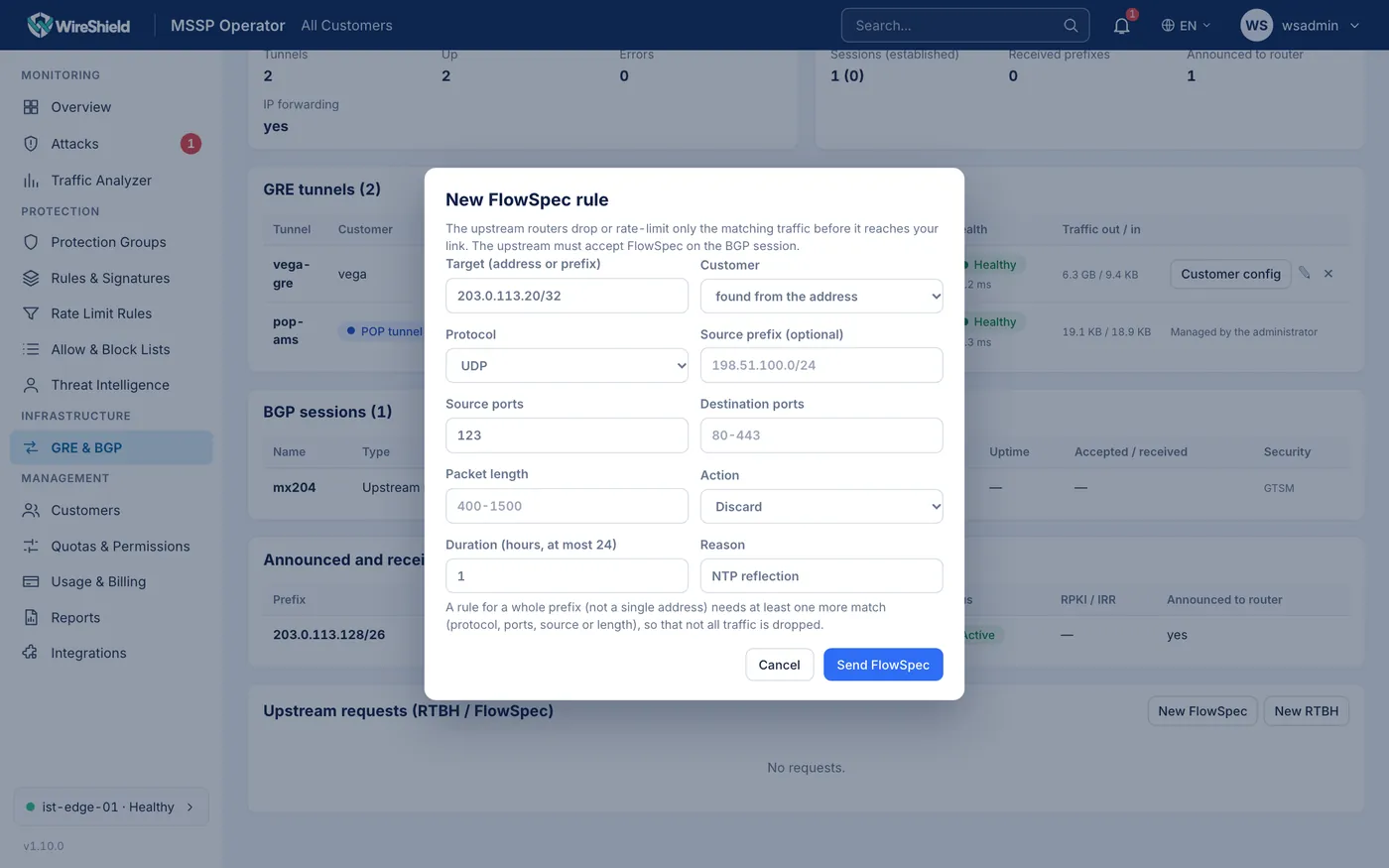
MSSP → GRE & BGP → Upstream requests card and the New FlowSpec form
6.7 Customer view
In the customer portal:
- Network → GRE Tunnels: the customer's tunnels, appliance address, router address, inner addresses, prefixes and health (read-only).
- Network → BGP Sessions: the customer's BGP sessions and announced prefixes.
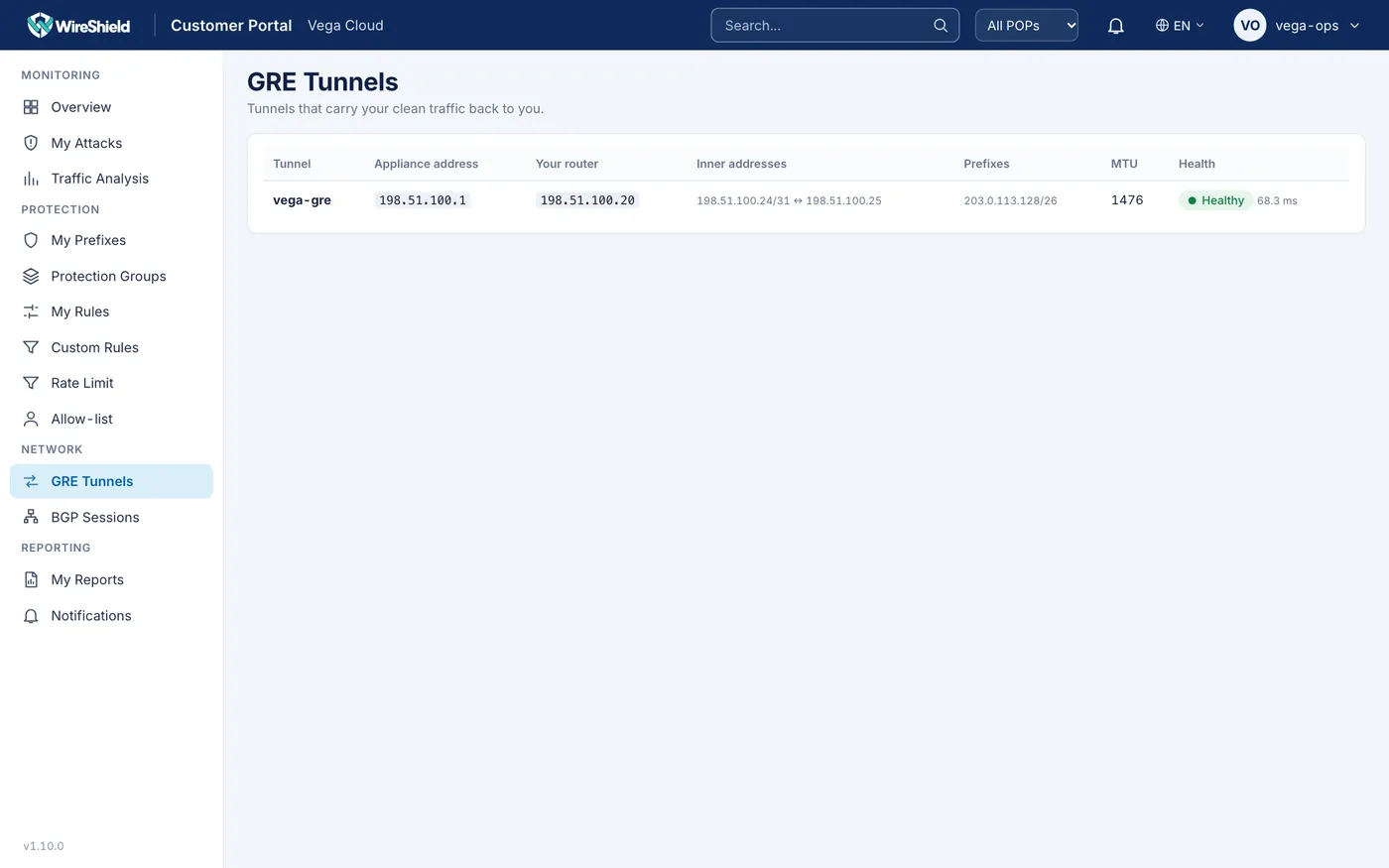
Customer Portal → GRE Tunnels page